Some cameras, encoders, and specialist video sources already produce usable RTSP or HTTP MJPEG streams but do not support ONVIF device management. That makes them harder to add, maintain, and review inside a VMS that expects ONVIF behavior for discovery, authentication, and recording control.
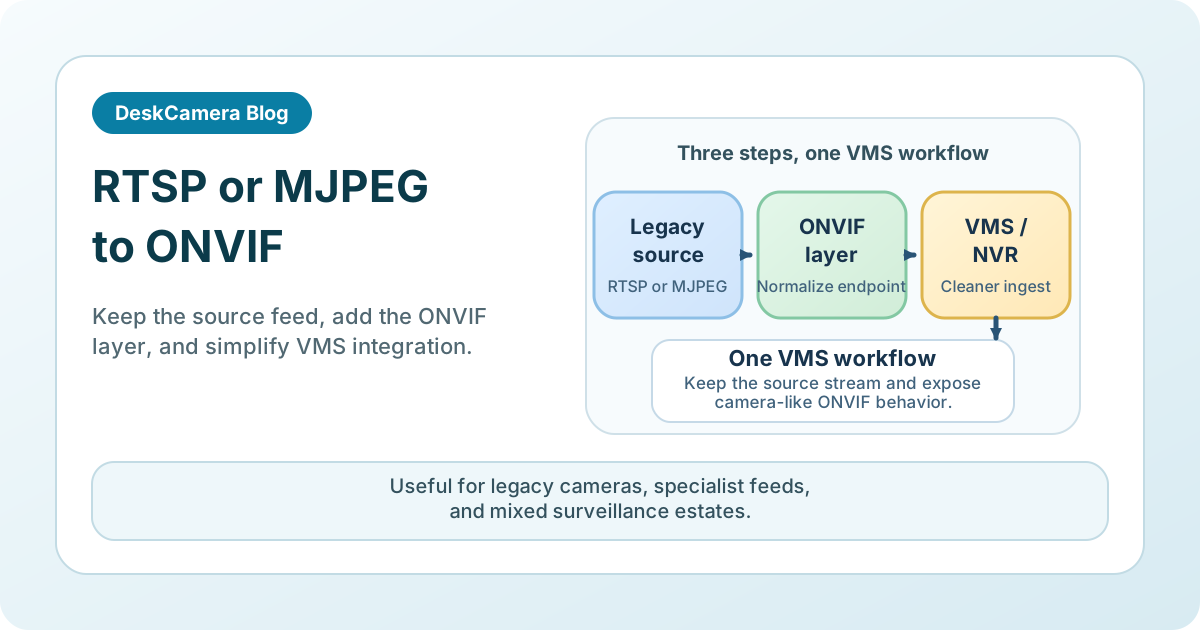
DeskCamera can act as a protocol bridge: it ingests an external HTTP MJPEG or RTSP stream on a Windows host and exposes it as a virtual ONVIF camera endpoint. The VMS then discovers, records, and manages that source like any other camera on the network.
When Protocol Conversion Makes Sense
Mixed estates are common. Some cameras and specialist devices still expose only HTTP MJPEG or RTSP. Others come from software, analytics pipelines, or thermal systems that can produce video but not a clean ONVIF device interface.
Converting the stream into an ONVIF-manageable endpoint gives the VMS a more consistent way to add, record, and review that source. It can reduce one-off integrations and let operators work in the same workflow they already use for other cameras.
If the source is a Windows screen or application rather than an external network stream, start with Can a PC Act as an ONVIF IP Camera? .
Use Legacy Cameras with Modern VMSes
Many organizations still have cameras or encoders that produce usable video but do not fit cleanly into current ONVIF-based rollouts. Replacing every source at once is expensive and often unnecessary.
A conversion layer can extend the useful life of those devices while the rest of the environment modernizes. That is especially useful in multi-site estates, temporary upgrades, and projects where procurement cycles lag behind operational needs.
Where This Fits in Practice
Converting external HTTP MJPEG or RTSP streams into ONVIF endpoints is most useful in a few repeatable situations:
Multi-site surveillance
Remote sites often accumulate a mix of old and new sources. Normalizing them can simplify how central teams add and manage video inside the VMS.
Cost-effective upgrades
Teams can phase improvements instead of replacing every working camera immediately. The conversion layer buys time while standards and budgets catch up.
Integration with third-party software
Some specialist applications generate or decorate video feeds, but operators still want to add that output into the surveillance system like a camera.
Remote monitoring
When several feeds need to land in the same VMS or NVR workflow, a bridge layer can reduce operational sprawl and keep review inside one platform.
Real Deployments Using This Approach
- David Scott, Safety and Security Manager , converted RTSP cameras into ONVIF-manageable endpoints using DeskCamera. Same-day support and a follow-up software release resolved a compatibility issue that had remained open elsewhere.
- Larry Roy, Software Architect at Embedded Logix , used DeskCamera to send analytics-decorated infrared camera images to a VMS when the original cameras did not provide the required stream directly — avoiding expensive HDMI-to-RTSP gateway hardware and solving a year-long integration problem.
Both cases started with a working video source that could not land cleanly in an ONVIF-oriented VMS. The conversion layer removed the need for extra gateway hardware or one-off VMS workarounds.
What to Validate Before Rollout
Before adopting any RTSP-to-ONVIF or HTTP-to-ONVIF bridge, check the points that usually determine whether the pilot holds up in production:
- The source stream is stable and documented.
- The source codec, resolution, and frame rate are acceptable for the target investigation workflow.
- Authentication can be handled cleanly on both the source side and the VMS side.
- Discovery, recording, reconnect, and failover behavior are tested in the target VMS.
- The team is clear about where the conversion layer runs and how that host is managed.
DeskCamera is Windows software, so the bridge layer lives on a Windows endpoint or server that ingests the external stream and exposes it as a virtual ONVIF camera. If the main requirement is screen capture from that Windows host itself, see How to Record a Computer Screen to a VMS .
Common Pitfalls With Protocol Bridges
Protocol conversion is not the same as full camera replacement. A bridge inherits the original stream’s limitations, and these are the places where pilots most often stall:
Codec mismatch
If the source is MJPEG and the VMS profile expects H.264, the bridge may need to transcode. That adds CPU or GPU load on the bridge host and can introduce latency. Confirm whether the conversion is passthrough or re-encode, and test the resulting host impact.
Resolution and frame-rate ceilings
The ONVIF endpoint cannot deliver better quality than the source provides. If the original camera caps at 15 fps or 720p, the converted stream will not exceed that. Set VMS recording profiles to match the source, not the VMS default.
Reconnect and failover behavior
When the source stream drops and recovers, the bridge host has to re-establish the ingest and the VMS has to recognize the ONVIF endpoint is live again. Test this explicitly — it is the most common gap between a demo and a real deployment.
Authentication chain
The bridge sits between the source’s credentials and the VMS’s ONVIF credentials. Both sides need to be managed. If the source changes its password or certificate, the bridge breaks silently unless the team has a process for credential changes on both ends.
Scaling Beyond One Source
As surveillance environments grow, exception handling becomes a long-term cost. One incompatible camera or application feed is manageable. Dozens of them are not.
Using a conversion layer makes expansion easier because the VMS sees more of the estate through a consistent device model. That does not eliminate rollout work, but it reduces the number of custom workflows operators have to maintain.
Security Considerations for Converted Streams
Protocol conversion does not fix a poor source feed, but it can standardize how that feed is authenticated, added, and recorded inside the surveillance environment.
The practical question is whether the converted source behaves predictably enough for the VMS and the security policy already in place. That includes operator visibility, retention alignment, and how credentials are managed across the source, bridge host, and VMS.
Next Step
If you need to bridge one representative HTTP MJPEG or RTSP source into an ONVIF-oriented VMS, review the DeskCamera feature set for the external-stream workflow, then start a free trial and validate discovery, authentication, recording, and reconnect behavior in your own environment.